Appearance
Skip to content
Is Redgate ending support for SQL Source Control?
Not according to Redgate’s current guidance, which no longer includes the dated support notice that prompted the original version of this article. Redgate has since changed its wording, so I’ve changed mine.[1]
The release record tells a clearer story: SQL Source Control gets mostly maintenance and compatibility updates, while Redgate calls Flyway its “next version.”[2][3] Yet Flyway still lacks SSMS integration and other familiar features.[1]
If you use SQL Source Control inside SSMS, that’s an awkward direction. But your next renewal isn’t a choice between standing still and leaving SSMS; there are alternatives that keep your existing workflow.
The notice changed. The direction did not.
In October 2023, Redgate’s “Moving from SQL Source Control to Flyway Desktop” page carried this notice:[1]
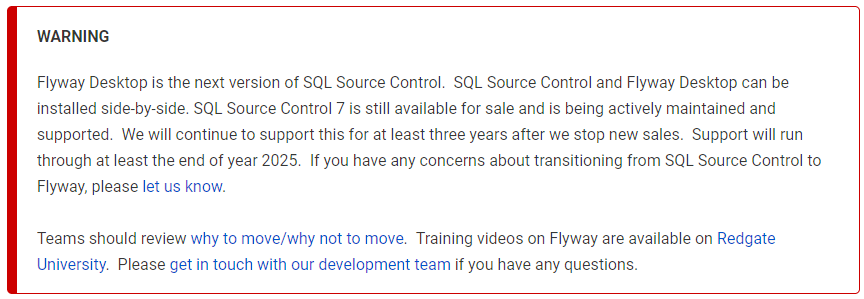
Redgate documentation, captured October 19, 2023.
The same page now just says SQL Source Control “continues to be actively maintained and supported.” The dated support window is gone, leaving less information about how long that support will continue.[1]
The release notes show what continued support means in practice, starting with two changes in 2023:
- May 4, 2023: migrations removed. Version 7.6.6 "fully removed migrations functionality" and directed users to Flyway Desktop.[4]
- December 13, 2023: Flyway-format projects restricted. Version 7.6.32 disabled "Commit, Push or Get latest" for projects already converted to Flyway format.[4]
Since then, it’s been mostly dependency updates, SSMS compatibility work, and bug fixes, with occasional smaller additions such as color themes. The emphasis remains on keeping the existing add-in stable as the platforms around it change.[3]
That stability matters to anyone who continues to depend on SQL Source Control. But keeping your workflow doesn’t mean you’ve stopped wanting better tools. Redgate identifies Flyway as SQL Source Control’s next version, but a renewal keeps you on the existing add-in. It doesn’t bring Flyway’s newer capabilities into your SSMS workflow.[2][1]
A tool still being built for SSMS
I’m still building VersionSQL for source control inside SSMS -- with releases that add new features, not just engine bumps. Recent additions include:
- Scheduled commits to save database changes automatically while SSMS is open.
.gitignorefile handling to fit modern Git workflows.- Gitea and Forgejo OAuth sign-in to make connecting to these newer platforms straightforward.
- Full-text history search to find earlier revisions from any scrap of text you remember.
- A
CREATE OR ALTERscripting option to give you more control over how the SQL is written.
You can judge the pace and substance for yourself in the changelog.
SQL Source Control vs Flyway vs VersionSQL
Here’s how the three compare for the work you do inside SSMS.[5]
| Feature | SQL Source Control | Flyway Enterprise | VersionSQL |
|---|---|---|---|
| SSMS integration | Yes | No | Yes |
| Version control integration | Git, Subversion, TFVC, working folder | Git, working folder | Git, Subversion, TFVC, working folder |
| Change-status icons in SSMS Object Explorer | Yes | No | No |
| Built-in object locking | Yes | No | Subversion only |
| Migration script generation | No[4] | Yes | Yes[6] |
| Roll back changes (Undo) | Yes | Yes | Yes |
| Pricing (USD per user, per year) | SQL Toolbelt Essentials bundle: $1,410[7] | "Book a consultation"[8] | Business: $199. Monthly and perpetual licenses also available. |
“VersionSQL is the best available alternative to Red Gate SQL Source Control.”
-- Ed Zerylnick, DBA

Moving tools doesn't mean starting over
Keep your repository and its commit history. VersionSQL's history window will show your earlier SQL Source Control commits alongside the new ones.
Install VersionSQL and connect to your existing repository using Redgate compatibility mode to match its layout. Review any scripting differences before committing a baseline. The migration guide includes a video and full walkthrough.
Before your next renewal, give VersionSQL a try. The 15-day trial needs no credit card and starts the first time you use a paid feature.
Download VersionSQL · Read the migration guide
Sources
Redgate, Moving from SQL Source Control to Flyway Desktop. Checked September 22, 2026. Historical screenshot captured October 19, 2023. ↩︎
Redgate, The journey to Flyway, updated February 5, 2025; checked September 22, 2026. ↩︎
Redgate, SQL Source Control release notes for 7.7, 7.8, 7.9, 8.0, and 8.1. Checked September 22, 2026. ↩︎
Redgate, SQL Source Control 7.6 release notes, versions 7.6.6 and 7.6.32; checked September 22, 2026. ↩︎
Redgate, Moving from SQL Source Control to Flyway Desktop (comparison table), SQL Source Control supported systems, Flyway working with other version control systems, and SQL Source Control walkthrough. Checked September 22, 2026. ↩︎
VersionSQL, Schema Compare and Deploy, checked September 25, 2026. VersionSQL generates state-based deployment SQL rather than managing a Flyway-style migration sequence. ↩︎
Redgate, SQL Source Control pricing, checked September 22, 2026. The $1,410 figure is the published bundle price, not an individual customer's renewal quote. ↩︎
Redgate, Flyway pricing, checked September 22, 2026. ↩︎