
Appearance
Deployment Script Generation
Deploying database changes manually can be a huge pain. There's a plethora of missteps you can make (many of which are time-consuming to repair) and it's hard to keep track of everything that needs to go live. What if there were a way to package up all the changes into one script, automatically?
Starting with VersionSQL 2.0, you can generate deployment scripts directly from within SQL Server Management Studio. This means that you can pick your revision from version control and VersionSQL will create the script necessary to push those schema changes to another database. No more worrying about missing an object when deploying changes -- let VersionSQL handle the prep work for you!
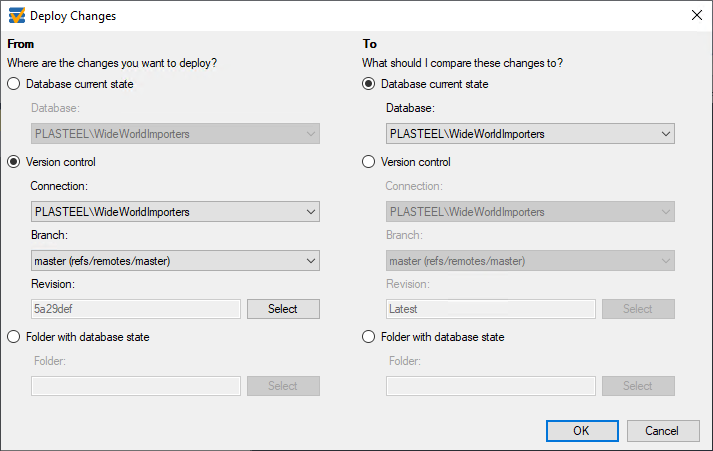
To use the deployment script feature, right-click on your database in SSMS' Object Explorer and select "Deploy Changes" from the VersionSQL menu. A window will pop up with source and destination options. Select what you want to deploy and where, then hit "OK." After a minute, VersionSQL will open your very own deployment script in a new query window, ready for your review.
Options
Drop Objects Not in Source
Enabled by default. When checked, the deployment script includes DROP statements for database objects that exist on the target but are not present in the source. This keeps the destination in sync by removing orphaned objects.
Uncheck this option if you only want the script to add and alter objects without dropping anything — useful when deploying a subset of changes or when extra caution is needed.